
Best couple prompt in 2026 AI Prompt
 By admin
0 Comments
By admin
0 Comments
Photorealistic Couple Photo Prompt: Shoulder Hug Pose, Pink Saree & Romantic Background AI Prompt
AI photo editing has become increasingly popular, especially for creating photorealistic couple photos from ordinary images. People are particularly interested in AI prompts that can transform a simple photo into a realistic couple portrait with a romantic background, traditional outfits, natural poses, and professional photography effects.Best couple prompt in 2026 AI Prompt
If you want to create an image where a boy and girl are standing close together, the boy has his arm around the girl’s shoulder, both are smiling at the camera, and the overall environment looks romantic and elegant, using a well-written AI prompt is extremely important.
In this article, we will explore how to use a Photorealistic Couple Photo Shoulder Hug Prompt to create a beautiful romantic couple image. The concept includes a girl wearing a pink saree with traditional jewelry, a boy wearing a light pink oversized baggy shirt with white pants, a floral-decorated background, and warm decorative lights.
One of the most important aspects of AI photo editing is preserving the original identity and facial features of the people in the reference image as accurately as possible. For this reason, instructions such as “keep exact face,” “preserve identity,” and “natural facial features” can be included in the prompt.
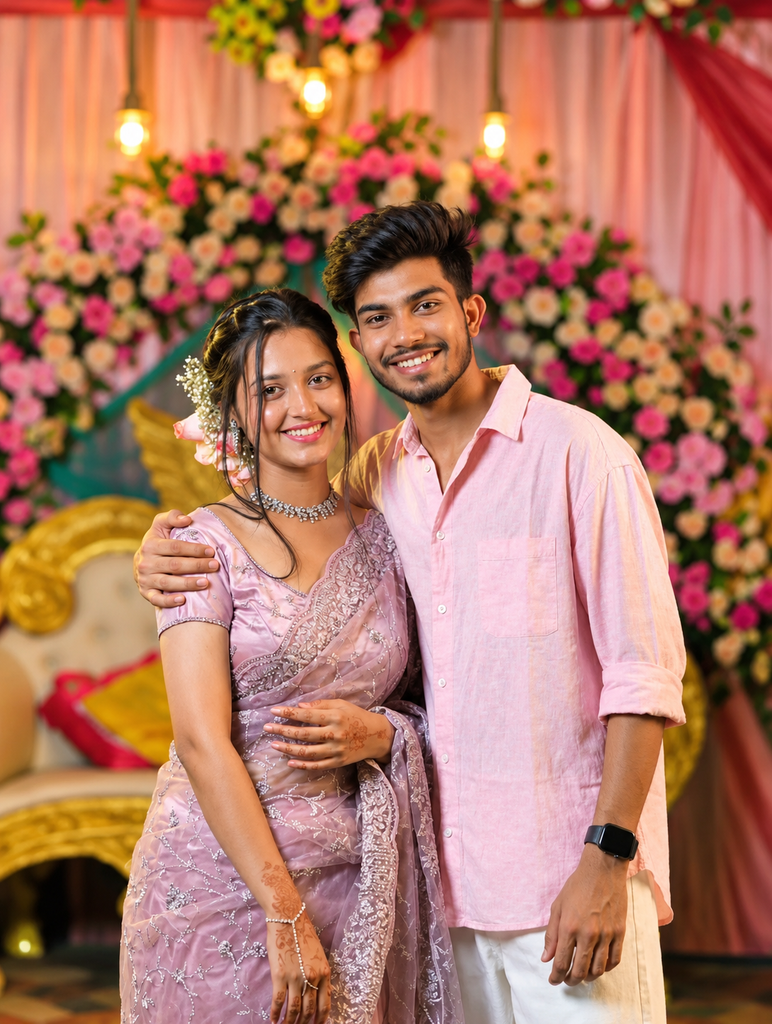
Create an ultra-realistic, high-resolution 4K portrait photograph of a young South Asian couple standing closely together at an elegant romantic wedding or engagement-style celebration. The couple is standing side by side in a natural, affectionate pose. The man is standing on the right with his left arm gently placed around the woman's shoulder. Both are looking directly at the camera and smiling naturally with warm, genuine expressions. The woman is wearing a beautiful pastel lavender-pink saree with intricate silver embroidery and a matching embroidered blouse. The saree should have realistic fabric texture, delicate decorative patterns, and an elegant drape. She is wearing a sparkling traditional choker necklace, matching earrings, delicate bangles, and subtle traditional jewelry. Her hair is styled neatly with soft loose strands framing her face, decorated with white and pink flowers at the back. Add subtle mehndi/henna designs on her hands. Keep her appearance elegant and natural. The man is wearing a light pastel pink casual oversized button-up shirt with the sleeves rolled slightly upward, paired with clean white trousers. Add a realistic black smartwatch on his wrist. His hairstyle is modern, naturally textured, and neatly styled. His appearance should be casual, handsome, and realistic. The background is a luxurious romantic Indian wedding-style decoration. Create a large floral backdrop filled with pink, white, peach, and light-colored flowers with natural green foliage. Add soft pink fabric drapes behind the couple and warm hanging Edison-style pendant bulbs. Include a beautifully decorated cream and gold ornate sofa partially visible behind them. Use warm cinematic ambient lighting with soft golden highlights on the couple's faces. Add realistic warm bokeh from the decorative lights and flowers in the background. The background should have a shallow depth of field and beautiful natural blur while the couple remains sharply focused. Composition should look like professional Indian wedding photography. Medium-full vertical portrait, couple centered in the frame, natural body proportions, realistic hands and fingers, realistic facial details, realistic hair strands, realistic saree fabric, realistic shirt fabric, natural skin texture, accurate shadows, balanced exposure, subtle cinematic color grading, soft highlights, realistic depth of field. The image must look like a real photograph taken with a professional full-frame camera and an 85mm portrait lens, with sharp facial details and creamy background bokeh. Photorealistic, ultra-detailed, 4K quality, professional wedding photography, natural skin texture, realistic colors, authentic lighting, realistic anatomy, natural expressions, premium photography, high dynamic range, shallow depth of field. Avoid cartoon style, CGI appearance, plastic skin, excessive beauty retouching, distorted faces, unnatural hands, extra fingers, missing fingers, malformed arms, incorrect body proportions, duplicate people, blurry faces, oversaturated colors, artificial-looking jewelry, unrealistic clothing, harsh lighting, excessive sharpening, and fake-looking skin.
What Is a Photorealistic Couple Photo Prompt?
A photorealistic couple photo prompt is a detailed text instruction used to tell an AI image generator or AI photo editing tool how to create or edit a realistic couple photograph.
Compared with a simple prompt such as “make a romantic couple photo,” a detailed prompt provides much more specific instructions. It can describe the clothing, pose, facial expressions, lighting, background, camera style, and overall mood of the image.
The main concept of this article includes:
- Photorealistic couple photo
- Shoulder hug pose
- Pink saree
- Traditional jewelry
- Light pink oversized shirt
- White pants
- Floral-decorated background
- Warm decorative lights
- Both subjects smiling at the camera
- Romantic atmosphere
- Natural skin texture
- Original facial identity preservation
- Top-corner signature: “avik biswas”
Combining these elements gives the AI a clear visual direction for creating a romantic couple portrait.
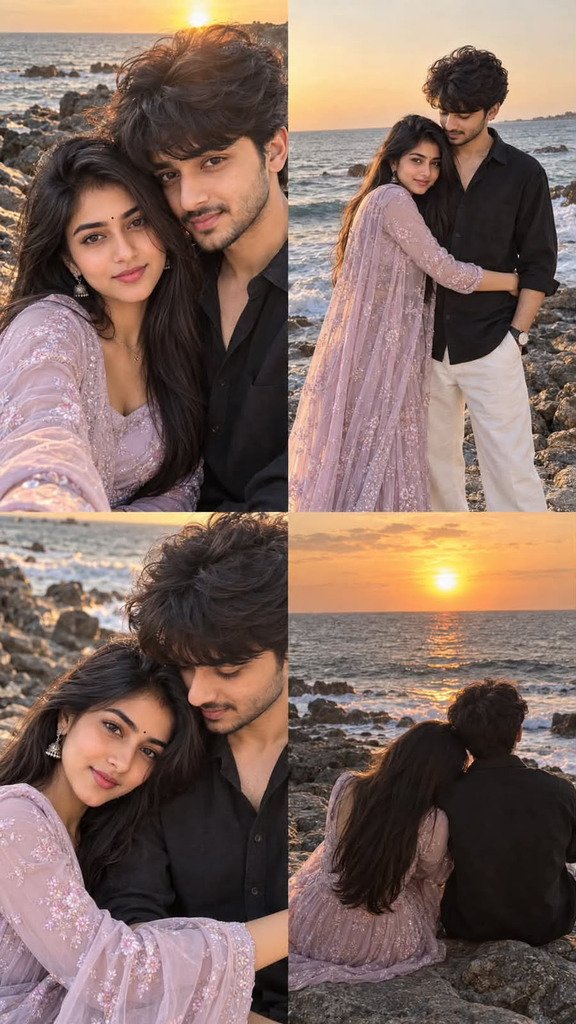
Enter your Create a highly realistic 4K vertical 2×2 photo collage featuring the SAME young South Asian couple in all four photographs. Maintain consistent facial identity, hairstyle, body proportions, clothing, skin tone, and overall appearance across every panel. The setting is a beautiful rocky seaside during golden hour and sunset. The ocean is visible in the background with natural waves, dark coastal rocks, warm sunlight, and a soft orange-pink evening sky. The entire collage should look like authentic professional couple photography captured on a smartphone or high-end camera, not an AI-generated image. THE GIRL: A young South Asian woman with long, naturally flowing dark hair, soft facial features, natural makeup, a tiny black bindi, delicate earrings, and an elegant feminine appearance. She is wearing a beautiful pastel lavender/lilac traditional Indian outfit with delicate floral embroidery and semi-transparent embroidered fabric. The outfit should flow naturally in the sea breeze. THE BOY: A young South Asian man with thick, slightly messy wavy dark hair, light natural facial hair, sharp but natural facial features, and a relaxed masculine appearance. He is wearing a loose black button-up shirt with the sleeves naturally rolled slightly and clean white trousers. Add a simple classic wristwatch. Keep the exact same couple and exact same outfits in every panel. PANEL 1 — INTIMATE SELFIE: A close-up romantic selfie of the couple standing very close together beside the rocky ocean. The girl is slightly in front, holding the camera at arm's length as if taking a natural selfie. The boy is standing closely behind/beside her, leaning toward her. Both look directly into the camera with subtle natural expressions. Wind gently moves their hair. The setting sun is visible behind them near the horizon, creating beautiful golden rim lighting around their hair. Ocean waves and rocks are softly visible in the background. PANEL 2 — FULL-BODY COUPLE PORTRAIT: A full-body photograph of the same couple standing together on dark coastal rocks beside the ocean. The girl stands close to the boy with one arm wrapped naturally around his waist/abdomen. The boy looks affectionately down toward her while she looks toward the camera. Their pose should feel natural, intimate, and candid rather than posed. Show the girl's long lavender embroidered outfit flowing naturally. The boy wears the same black shirt and white trousers. Warm sunset light illuminates them from behind and the side. PANEL 3 — CLOSE ROMANTIC PORTRAIT: A close-up cinematic photograph of the same couple sitting or leaning together on the rocky shoreline. The girl's head rests gently against the boy's chest/shoulder while she looks toward the camera with a soft romantic expression. The boy looks down affectionately toward her. Their faces are close together. Capture natural hair movement from the sea breeze. Use shallow depth of field with the ocean and rocks softly blurred behind them. Warm golden-hour lighting should create a dreamy romantic atmosphere. PANEL 4 — BACK VIEW AT SUNSET: A cinematic rear-view photograph of the same couple sitting closely together on large seaside rocks, looking toward the ocean and setting sun. The camera is positioned behind them. The girl's long dark hair falls naturally down her back and her lavender embroidered outfit spreads softly around her. The boy wears the same black shirt and white trousers. They sit close together, creating a peaceful romantic silhouette. The sun is low over the ocean horizon, with orange, peach, and golden colors reflecting across the water. Waves gently break against the rocks. OVERALL VISUAL STYLE: Authentic Indian romantic couple photography, realistic South Asian appearance, natural skin texture, realistic hair strands, realistic clothing fabric, accurate hands and fingers, natural body proportions, genuine facial expressions, subtle romantic chemistry, candid photography, golden-hour sunset lighting, warm orange and pink tones, realistic ocean water, detailed coastal rocks, soft cinematic depth of field, natural lens flare, realistic shadows, professional photography, high dynamic range, ultra-detailed, photorealistic, 4K resolution. Make the four photographs visually consistent as if they were captured during the SAME beach photoshoot within a few minutes of each other. The final output must be a clean vertical 2×2 collage with four separate photographic frames, equal-sized panels, seamless composition, no borders between the photographs, and consistent color grading. Avoid cartoon, anime, illustration, CGI, plastic skin, excessive beauty retouching, unrealistic faces, face distortion, different people between panels, different clothes between panels, extra fingers, missing fingers, malformed hands, unnatural limbs, duplicate people, artificial-looking hair, oversaturated colors, excessive blur, fake ocean, unrealistic sunset, and unnatural poses.text here…
Best Photorealistic Couple Photo Prompt
You can copy the following prompt and use it with your preferred AI image generation or photo editing tool.
Photorealistic romantic couple portrait, a boy and girl standing closely together in a natural shoulder hug pose. Keep the girl's exact facial identity, facial features, and natural expression unchanged. The girl is wearing an elegant pink saree with beautiful traditional jewelry, earrings, necklace, and bangles. Keep her appearance realistic, graceful, and natural.

The boy is standing beside the girl with his arm naturally placed around her shoulder in a warm shoulder hug. Keep the boy's exact facial identity and facial features unchanged. He is wearing a light pink oversized baggy shirt with clean white pants. Both are smiling naturally and looking directly at the camera.

Create a beautiful romantic floral-decorated background with pink and white flowers, greenery, soft decorative elements, and warm glowing fairy lights. Add realistic warm ambient lighting, soft golden bokeh, natural shadows, and professional portrait photography aesthetics.

Make the image highly photorealistic, with realistic skin texture, natural facial details, realistic hair, accurate hands and fingers, natural body proportions, detailed clothing fabric, and authentic photographic depth of field.

The overall mood should be romantic, elegant, warm, and joyful. Use a premium professional photography composition with realistic colors and cinematic background blur.

Add a subtle handwritten signature text "avik biswas" in the top corner. Keep the signature elegant and unobtrusive.

Ultra-realistic photography, natural expressions, realistic lighting, detailed textures, professional camera quality, shallow depth of field, high detail, authentic photography, no cartoon effect, no artificial-looking skin.
read more..
Why Is the Shoulder Hug Pose So Popular?
The shoulder hug is a very natural and comfortable pose for couple photography. In this pose, both people stand close to each other while one person places an arm around the other’s shoulder.
This creates a sense of closeness without making the pose look overly artificial. Natural body positioning is particularly important when creating AI-generated couple portraits.
Some important characteristics of this pose include:
1. Both People Stand Together
The boy and girl should stand at a natural distance from each other rather than being too far apart.
2. The Boy’s Arm Is Around the Girl’s Shoulder
This is the main visual element of the shoulder hug pose.
3. Both Look at the Camera
Direct eye contact with the camera helps give the image the appearance of professional portrait photography.
4. A Natural Smile
Instead of an exaggerated expression, a soft and natural smile generally looks more realistic.
5. Natural Body Position
Giving the AI instructions for realistic body proportions and natural posture can help create a more believable image.
Girl Pink Saree & Jewelry Prompt
The girl’s outfit is one of the main visual elements of this type of image. Therefore, it is useful to provide specific instructions about the saree and jewelry.
You can use the following section separately:
The girl is wearing an elegant pink saree with delicate traditional embroidery and a graceful drape. Add tasteful traditional jewelry including earrings, necklace, and bangles. Preserve her exact facial identity, facial structure, natural skin texture, and authentic expression. Keep her appearance elegant, realistic, and photorealistic.
The combination of a pink saree and traditional jewelry creates a festive and romantic feeling.
If the jewelry becomes too large or unrealistic in the AI-generated image, you can add words such as “tasteful,” “subtle,” and “realistic” to the prompt..
Boy Light Pink Oversized Shirt Prompt
The boy’s outfit is designed to look modern and casual, using a light pink oversized shirt with white pants.
The boy is wearing a stylish light pink oversized baggy shirt with clean white pants. The clothing should look realistic, naturally fitted, and made from detailed fabric. Preserve his exact facial identity, facial structure, and natural expression.
The light pink shirt and the girl’s pink saree create a coordinated color palette.
The white pants keep the outfit balanced and provide clean visual contrast against the floral background.
Romantic Floral Background Prompt
A good background is important for the overall quality of a couple portrait. Therefore, it is useful to provide detailed instructions when creating a floral background.
Create an elegant romantic floral background filled with beautiful pink and white flowers, soft green leaves, decorative greenery, and warm glowing fairy lights. Add subtle golden bokeh in the background with realistic depth of field. The background should look like a professionally decorated romantic celebration venue.
This type of background can work well for wedding ceremonies, engagements, anniversaries, festive celebrations, or romantic portraits.
How to Create a Warm Light Effect
Warm lighting is an important element of romantic photography. Compared with ordinary white lighting, golden or warm lighting can create a softer and more emotional atmosphere.
You can use the following instruction:
Warm golden ambient lighting, soft fairy lights, subtle golden bokeh, gentle highlights on the faces, realistic shadows, and cinematic warm tones.
However, if the lighting is too bright, facial details may be lost. Therefore, soft warm lighting is generally preferable for this style.
Prompt for Preserving the Exact Face
One of the most common challenges in AI image editing is that the original face may change. This can happen especially when a reference image is used to create a new pose, outfit, or environment.
You can include the following instruction in your prompt:
Keep the person's exact facial identity and recognizable facial features unchanged. Preserve the original face shape, eyes, nose, lips, skin texture, and natural expression. Do not replace or redesign the face.
This instruction can be used for both the boy and the girl.
However, the final result does not depend entirely on the prompt. The image-editing capabilities of the particular AI tool and its support for reference images can also affect the result.
Best Negative Prompt for a Couple Photo
Many AI image generators support negative prompts. If your tool supports them, you can try the following:
cartoon, anime, illustration, painting, artificial face, plastic skin, excessive skin smoothing, distorted face, changed identity, unrealistic eyes, asymmetrical face, deformed hands, extra fingers, missing fingers, fused fingers, unnatural arms, incorrect body proportions, duplicate person, blurry face, low resolution, oversaturated colors, harsh lighting, unnatural smile, distorted jewelry, unrealistic clothing, duplicate accessories, bad anatomy, artificial background, text errors, watermark
The purpose of this negative prompt is to help reduce some common unwanted artifacts that may appear during AI image generation.
Why Is a Reference Image Important for Creating an AI Couple Photo?
If you want to preserve the face of a specific person, using a high-quality reference photo is important.
Here are some things to consider when choosing a reference image:
Clear Face
Make sure the face is not blurry.
Good Lighting
Avoid extremely dark or overexposed photos.
Front or Three-Quarter View
When the face is clearly visible, it may be easier for the AI to understand the facial structure.
Minimal Filters
It is generally better to avoid photos with heavy beauty filters.
High-Resolution Image
A higher-quality reference image can provide more visible facial detail for the editing process.
How to Get a Natural Smile in a Couple Photo
AI-generated images sometimes produce smiles that look exaggerated or artificial. To encourage a more natural expression, you can use phrases such as “natural smile” or “soft genuine smile.”
For example:
Both subjects are smiling naturally and softly while looking directly at the camera, with relaxed facial expressions and authentic emotions.
This tells the AI to aim for a subtle expression instead of an exaggerated smile.
Couple Photo Prompt for Instagram
For a social media post, you can use a more polished version of the prompt:
Create a premium photorealistic romantic couple portrait suitable for Instagram. A boy and girl are standing together in a natural shoulder hug pose, both smiling at the camera. Preserve both faces and identities accurately.

The girl wears an elegant pink saree with beautiful traditional jewelry. The boy wears a light pink oversized baggy shirt with white pants. Add a romantic floral background with pink and white flowers, greenery, and warm glowing fairy lights.

Use cinematic warm lighting, realistic skin texture, soft golden bokeh, natural shadows, and professional portrait photography. Keep body proportions, hands, and facial details realistic.

Add the handwritten signature "avik biswas" subtly in the top corner. High-resolution photorealistic photography, elegant composition, realistic colors, shallow depth of field, and premium camera quality.
Wedding Style Couple Prompt
If you want the image to have a wedding-style decoration, you can use:
Photorealistic South Asian couple portrait in an elegant wedding-style setting. Preserve both subjects' exact facial identities and natural expressions. The girl wears a beautiful pink saree with traditional jewelry, while the boy wears a light pink oversized shirt and white pants.

The boy stands beside the girl with his arm naturally around her shoulder. Both are smiling at the camera. Create a luxurious floral wedding backdrop with pink and white flowers, greenery, warm fairy lights, and soft golden bokeh.

Use realistic professional photography, natural skin texture, detailed fabric, accurate hands and fingers, realistic proportions, cinematic warm lighting, and shallow depth of field. Add a subtle handwritten "avik biswas" signature in the top corner.
Camera Style Prompt for Couple Photography
You can also use camera-related language to encourage a photorealistic result.
For example:
Professional full-frame portrait photography, 85mm portrait lens look, natural depth of field, soft background bokeh, realistic skin texture, balanced exposure, subtle cinematic color grading, and natural warm highlights.
Mentioning an 85mm portrait lens look can help suggest the visual characteristics of traditional portrait photography.
Important Keywords for AI Couple Photo Prompts
If you want to create your own prompts, you can use the following keywords:
- Photorealistic
- Realistic portrait
- Couple photography
- Shoulder hug
- Natural pose
- Natural smile
- Pink saree
- Traditional jewelry
- Light pink shirt
- White pants
- Floral background
- Warm fairy lights
- Golden bokeh
- Cinematic lighting
- Realistic skin texture
- Natural facial features
- Preserve identity
- Professional photography
- Shallow depth of field
- High resolution
- Detailed clothing
- Natural shadows
- Romantic atmosphere
You can combine these keywords according to your requirements to create different variations of the same basic prompt.
Turning a Mobile Photo into a Professional Couple Portrait
Many people want to transform an ordinary mobile-camera photo into something that looks more like a professional portrait. In this situation, you can add phrases such as “professional portrait photography” and “realistic depth of field.”
For example:
Transform the original mobile photo into a professional photorealistic couple portrait while preserving both subjects' facial identities. Improve the overall lighting, background depth, and photographic quality without making the faces look artificial.
You can then add your preferred outfit, pose, background, and lighting instructions.
Common Mistakes to Avoid When Editing AI Photos
Some common mistakes can negatively affect the final result.
Using a Very Short Prompt
“Make a romantic couple photo” is a very general instruction. The AI may choose its own clothing, pose, background, and overall style.
Not Mentioning Face Preservation
If the face in the reference image is important, it is useful to include an identity-preservation instruction.
Adding Too Many Conflicting Details
If a prompt contains many conflicting instructions, the AI may struggle to follow them consistently. It is better to organize instructions according to priority.
Making the Background Too Complex
Too many objects can sometimes result in unwanted artifacts in the background.
Not Using a Negative Prompt
If your AI tool supports negative prompts, you can use one to help reduce unwanted anatomy and rendering issues.
“avik biswas” Signature Prompt
If you want to add your name as a signature in the top corner of the image, use:
Add a small elegant handwritten signature reading "avik biswas" in the top corner. Keep the signature subtle, clean, and stylish without covering the subjects.
Keeping the signature small and subtle helps maintain focus on the main portrait.
Short 80s-Style Prompt
If you want to give the same couple image a vintage 1980s look, try:
Transform this photorealistic couple portrait into an authentic 1980s analog film photograph. Preserve both faces and identities. Keep the shoulder hug pose, pink saree and jewelry, light pink oversized shirt, and white pants. Add warm vintage colors, subtle film grain, soft flash, slightly faded tones, natural skin texture, floral background, and glowing warm lights. Add "avik biswas" as a subtle handwritten signature in the top corner. Realistic 1980s film photography, natural expressions, and authentic analog texture.
Which AI Tools Can Be Used for This Prompt?
This type of text-based image prompt can be used with different AI image-generation and photo-editing platforms. However, each tool interprets prompts differently, and their reference-image capabilities may vary.
If the tool allows you to upload your own image and provide a text prompt, using a reference image + detailed prompt can give you more control over the editing process.
Depending on the tool, you may need to adjust the prompt length and formatting.
SEO Keywords for Photorealistic Couple Photo Prompts
Here are some useful search keywords related to this topic.
Primary Keyword
Photorealistic Couple Photo Prompt
Secondary Keywords
- Couple Photo AI Prompt
- Shoulder Hug Pose Prompt
- Romantic Couple Photo Prompt
- AI Couple Photo Editing Prompt
- Pink Saree Couple Prompt
- Couple Hug AI Prompt
- Realistic Couple Image Prompt
- AI Couple Photography Prompt
- Romantic AI Photo Prompt
- Couple Photo Editing Prompt
- Pink Saree AI Prompt
- AI Photo Editing Prompts
- Photorealistic AI Image Prompt
- Couple Portrait Prompt
- AI Romantic Photo Editing
FAQ: Photorealistic Couple Photo Prompt
1. What is a Photorealistic Couple Photo Prompt?
It is a detailed AI prompt that provides specific instructions for creating or editing a realistic couple portrait using an AI image generator or photo-editing tool.
2. What is a Shoulder Hug Pose?
A shoulder hug pose generally involves one person standing beside another and placing an arm around their shoulder. It is a natural and romantic pose commonly used in couple photography.
3. What Background Works Well with a Pink Saree?
Pink and white flowers, greenery, warm fairy lights, and soft golden bokeh can work well with a romantic pink saree portrait.
4. How Can I Preserve the Original Face?
You can include instructions such as “preserve exact facial identity,” “keep facial features unchanged,” and “maintain natural facial structure” in your prompt.
5. Can AI Change the Original Face?
Yes. Some image-generation tools may create facial variations even when a reference image is provided. A high-quality reference image and clear identity-preservation instructions may help reduce unwanted changes.
6. Why Use a Light Pink Shirt for the Boy?
A light pink shirt creates a coordinated color palette with the pink saree. White pants provide a clean and balanced appearance.
7. Where Can I Add the “avik biswas” Signature?
The prompt instructs the AI to place a subtle handwritten signature in the top corner. You can replace “avik biswas” with your own name if needed.
8. Can This Prompt Be Used for Instagram Photos?
Yes. You can modify the composition, aspect ratio, background, and style instructions to create images for Instagram, Facebook, profile pictures, or personal photography posts.
9. How Can I Make an AI Couple Photo Look More Realistic?
You can use instructions for realistic skin texture, natural lighting, accurate hands, realistic body proportions, shallow depth of field, and professional photography.
10. Is a Negative Prompt Necessary?
No. A negative prompt is not required by every AI tool. However, if your tool supports negative prompts, one can be used to help reduce certain unwanted artifacts.
Table of Contents
Final Words
Creating a beautiful Photorealistic Couple Photo may require more than a simple AI prompt. For better results, it is useful to clearly describe the pose, facial identity, clothing, background, lighting, and photographic style.
The main prompt in this article combines a natural shoulder hug pose, a girl wearing a pink saree and traditional jewelry, a boy wearing a light pink oversized baggy shirt and white pants, a floral-decorated background, warm decorative lights, and natural smiling expressions.
When working with a reference photo, face identity preservation is particularly important. Instructions for realistic skin texture, natural hands, accurate body proportions, and professional photography can also help the AI create a more natural-looking result.
You can use the same base prompt to create many different types of couple portraits by changing the outfit, background, lighting, and pose. For example, you can create wedding couple photos, engagement portraits, traditional Indian couple photos, outdoor couple portraits, sunset couple photos, vintage portraits, or 1980s retro-style couple photos.
Finally, remember that a good AI-generated image depends not only on the prompt but also on the quality of the reference photo and the capabilities of the AI editing tool. The clearer and more logically structured your prompt is, the easier it is for the AI to understand your desired visual direction.
